Smart, simple notebook viewing
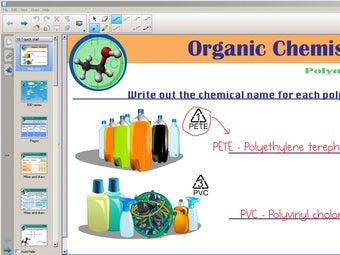
SMART Notebook Interactive Viewer makes opening and interacting with SMART Notebook files easy without the full software. It supports files from earlier versions and lets you view them on computers, displays, or interactive whiteboards, providing educators with a simple, reliable tool for basic lesson viewing and interaction.
Top Recommended Alternative

In daily use, SMART Notebook Interactive Viewer offers a focused experience for viewing notebook content and imported activity files. While it lacks the full authoring tools of SMART Notebook, the program provides dependable lesson access, simple interactivity, and digital ink support, ensuring educators can review and present material efficiently without unnecessary complexity.
Efficient viewing for educators
One of the biggest strengths of SMART Notebook Interactive Viewer is how easily it opens and displays lesson files without requiring the full authoring suite. The lightweight interface makes navigating pages and viewing content straightforward, while supporting interactive elements, objects, and digital ink annotations. Educators can quickly review lessons or present material with minimal effort, making it a convenient solution for classrooms or remote teaching scenarios.
Because the program focuses on viewing rather than creating, it does not include lesson design tools or extensive editing options. This trade-off simplifies use, but users needing to build lessons from scratch may find it limited. File format support and advanced features are also restricted compared to full SMART Notebook, though the tool remains practical for presenting, reviewing, or interacting with pre-made content efficiently.
Performance is smooth and reliable when handling legacy and current .notebook files. Users can interact with page elements and digital ink, though collaboration features and advanced annotation tools are not included. While other programs may offer greater flexibility, this viewer’s compatibility with existing lesson files ensures it remains a handy, no-frills option for educators needing dependable access to interactive materials.
Practical, basic viewing tool
SMART Notebook Interactive Viewer is a user-friendly tool for opening and interacting with SMART Notebook files without the complexity of full lesson design software. Its efficient performance, wide file compatibility, and support for interactive elements and digital ink make it ideal for educators and presenters. It enables easy lesson review, classroom demonstrations, or presentations while keeping the experience simple, focused, and centered on content rather than editing or design.